FRSC Shortlist 2026 Portal: Shortlist Is Out — Check Gmail & Applicant Dashboard
Welcome to this page, we provide update regarding recruitment, empowerment, grants and real job opportunities. In today’s article you will get FRSC Shortlisted Candidates 2026 PDF, and also Learn how to check your Gmail, access the FRSC applicant dashboard, verify your status and follow screening instructions online.
FRSC Shortlisted Candidates 2026: Shortlist Is Out, Check Gmail & Applicant Dashboard
The Federal Road Safety Corps (FRSC) recruitment shortlist for 2026 is now being communicated to applicants, with candidates advised to check the email address they used during registration for their recruitment notification.
If you applied for the FRSC Recruitment 2026, this is an important update to pay attention to. Some applicants are beginning to receive recruitment-related messages in their email inboxes, while others may need to log in to their applicant dashboard to check their current status and any available instructions.
Rather than depending on a PDF shared on WhatsApp, Facebook or Telegram, applicants should first check the email account connected to their FRSC application and then access the official recruitment portal.
This guide explains how to check your FRSC shortlist status, where to look for the email notification, how to access your dashboard, what to do if you have not received an email yet, and what shortlisted applicants should prepare for the next stage.
JOIN OUR COMMUNITY
FRSC Shortlist 2026: Latest Update
The FRSC shortlist process has moved to the notification stage for applicants who successfully progressed in the 2026 recruitment exercise.
Applicants should therefore check the same email address they provided when creating their FRSC recruitment account.
The email notification may contain important information about your application status, invitation, screening arrangements or the next stage of the recruitment process.
However, not receiving an email immediately does not necessarily mean that your application was unsuccessful. Applicants should also log in to the official FRSC recruitment portal and check their dashboard.
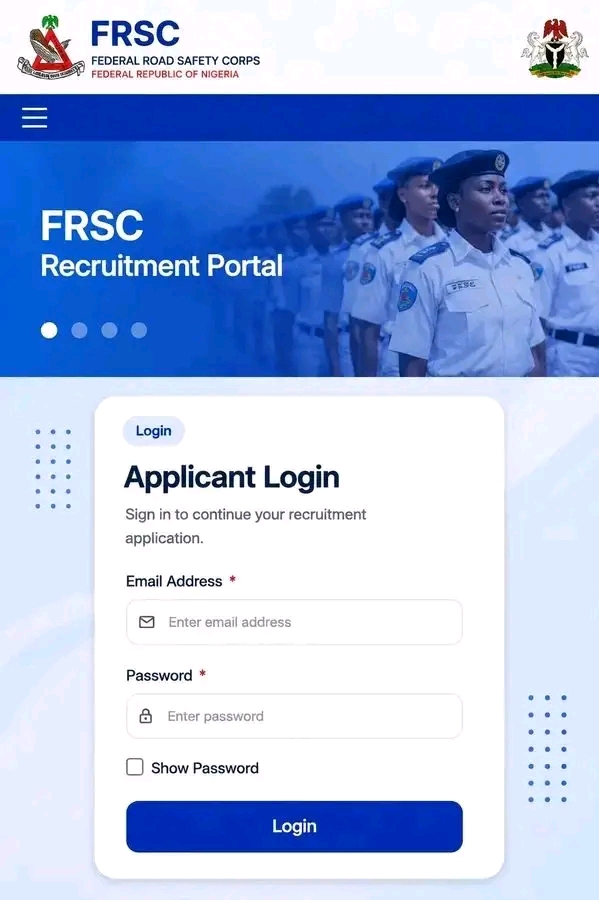
The official FRSC recruitment portal provides an applicant login where candidates can access their recruitment account.
How to Check FRSC Shortlisted Candidates 2026
If you applied for the 2026 FRSC recruitment, follow these steps carefully.
1. Check the Gmail or Email You Used During Registration
Open the email account you used when submitting your FRSC application.
If you normally use Gmail, open the Gmail app and search for messages relating to:
- FRSC
- Federal Road Safety Corps
- Recruitment
- Screening
- Application
- Invitation
Also check your Spam, Junk, Promotions and Updates folders.
Do not delete any recruitment email until you have read the instructions and saved the information.
2. Check the Sender Carefully
Do not assume that every message mentioning FRSC is genuine.
Look carefully at the sender’s email address and the contents of the message.
Be particularly careful if an email asks you to pay money, provide your password, send an OTP or contact an unknown person to “secure” your position.
3. Access Your FRSC Applicant Dashboard
If you have not received an email, the next step is to access your FRSC recruitment account.
Visit the official recruitment portal:
Select the login option and enter the email address and password associated with your application.
The official portal currently provides an applicant sign-in page and allows candidates to access their application account.
4. Check Your Application Status
After logging in, carefully review your dashboard.
Look for any new notification, recruitment status, screening instruction or message concerning the next stage.
If an invitation has been added to your account, read the information carefully before making any travel or screening arrangements.
5. Follow the Instructions Given to You
If you receive an invitation, do not rely on information given to another applicant.
Check your own:
- Screening date
- Screening venue
- Reporting time
- Applicant details
- Required documents
- Other instructions
Your individual notification should take priority over forwarded messages on social media.
Related Posts;
Police Recruitment Print Slip 2026: How to Print NPF Training Call-Up Slip & Reporting Date
NANS Business Grant 2026: Application Portal, Requirements & How to Apply For NANSInnovate
ECOWAS Recruitment 2026/2027 Portal: How to Apply for the Young Graduates Immersion Programme 2027
NDLEA Recruitment Portal 2026: Application Form & How to Apply Online
CDCFIB Recruitment 2026 Appointment Letter: Latest Update, Release Date & How to Check
NAQS Shortlist 2026 Update: New Release Date, Shortlisted Candidates & How to Check Your Name Online
What If You Have Not Received the FRSC Email?
This is one of the most important questions applicants are asking.
If you have not received a Gmail or email notification, do not panic immediately.
Email notifications may not arrive in every applicant’s inbox at exactly the same time.
First, check your Spam, Junk, Promotions and other folders.
Then log in to your FRSC applicant dashboard and check whether there is a new notification.
The official portal also provides options for applicants who have problems receiving activation emails.
Therefore, applicants should not conclude that they have been rejected simply because they have not seen an email.
FRSC Shortlist 2026: Gmail Notification Explained
Many applicants may be confused because they are checking for a public shortlist PDF while recruitment communication is appearing through email.
The important point is this:
Check the email account you used during your FRSC application.
If you used Gmail during registration, your notification will normally be looked for inside that Gmail account.
Search your mailbox instead of waiting for a message to appear at the top of your inbox.
You can search for terms such as FRSC, recruitment, screening or Federal Road Safety Corps.
What If Your FRSC Dashboard Has No Update?
If your dashboard does not show a new notification, check again later and make sure you are using the correct account.
Also confirm that:
- You are logging into the official FRSC portal.
- You are using the email associated with your application.
- Your password is correct.
- You have checked your email inbox and spam folders.
- You have not accidentally created another account.
Do not create a second recruitment account simply because you cannot immediately see an update.
FRSC Recruitment Portal Login 2026
Applicants can access their recruitment account through the official FRSC recruitment portal.
Open FRSC Recruitment Portal Login
The portal provides fields for the applicant’s email address and password and also provides options for password recovery and activation-related issues.
If you have forgotten your password, use the password recovery option rather than giving your login details to another person.
What Should FRSC Shortlisted Candidates Do Next?
If you have received an official invitation or your dashboard shows that you have progressed to the next stage, start preparing early.
Keep your recruitment information available and carefully follow the instructions attached to your notification.
Candidates should also prepare the original documents and photocopies specifically requested by FRSC.
Do not rely on an old checklist from a previous recruitment exercise if your 2026 invitation provides different instructions.
FRSC Screening: What Applicants Should Watch For
Applicants who receive a screening invitation should pay attention to the details contained in their notification.
Important information may include:
- Screening venue
- Date
- Reporting time
- Required documents
- Identification requirements
- Applicant reference or application details
- Other instructions from FRSC
The FRSC application system itself collected information including personal details, NIN, driver’s licence information, preferred physical screening venue and other recruitment information during application.
This is why applicants should carefully follow the instructions connected to their own application.
Don’t Pay Anyone for the FRSC Shortlist
The release of recruitment notifications usually creates an opportunity for scammers to target applicants.
Do not pay anyone who claims to be able to:
- Add your name to the shortlist
- Change your recruitment status
- Secure a screening invitation
- Change your screening venue
- Guarantee FRSC employment
- “Upgrade” your application
Your shortlist status should be verified through your official recruitment account and legitimate FRSC communication.
What If You Received an FRSC Email?
If you have received a recruitment email, do not immediately forward your personal information to someone claiming to help you.
First verify the contents.
Check whether the message corresponds with information available through your applicant account.
If the email contains a screening invitation, save it and carefully follow the instructions provided.
You can also log into your dashboard independently rather than clicking suspicious links contained in forwarded messages.
FRSC Shortlisted Candidates 2026: Important Reminder
The biggest mistake applicants can make at this stage is relying entirely on social media.
A friend may receive an email before you.
Another applicant may see a dashboard update while your account has not yet changed.
Someone may also share a screenshot without explaining where it came from.
For this reason, always check your own email and applicant dashboard.
Frequently Asked Questions
Is the FRSC shortlist 2026 out?
The FRSC shortlist notification process is now underway, and applicants should check the email address used during registration as well as their applicant dashboard for updates.
How will I know if I am shortlisted for FRSC?
Check the email account you used during registration and log in to your FRSC recruitment dashboard. Any official invitation or status update should be carefully reviewed before taking further action.
I have not received an FRSC email. What should I do?
Check your inbox, Spam, Junk, Promotions and Updates folders. Then log in to your applicant dashboard and check for a new notification. Do not assume that you were unsuccessful simply because an email has not appeared yet.
Where can I check my FRSC recruitment status?
Use the official FRSC recruitment portal and log in with the account details used during your application.
Is the FRSC shortlist available as a PDF?
Applicants should not depend on a PDF circulating on social media. Check your official recruitment account and email for your individual notification or instructions.
What email should I check?
Check the email address you used when creating and submitting your FRSC recruitment application. If that email is Gmail, check your Gmail inbox and other folders.
What happens after FRSC shortlisting?
Shortlisted or invited candidates should follow the instructions provided by FRSC concerning the next recruitment stage, including any screening or document verification requirements.
Can someone help me get shortlisted?
No legitimate person can guarantee that you will be shortlisted or employed by paying them. Avoid anyone requesting money in exchange for recruitment placement.
Conclusion
If you applied for FRSC Recruitment 2026, check your Gmail/email and applicant dashboard now.
Do not wait for a random WhatsApp or Facebook post to tell you what is happening with your application.
If you have received an invitation, read it carefully and follow the instructions attached to your own application.
If you have not received anything yet, check your Spam and Junk folders and log into the official recruitment portal to verify your status.
Most importantly, do not give your password, OTP or money to anyone claiming to have access to the FRSC shortlist.
We will continue to update this page as verified information about the FRSC screening and next recruitment stage becomes available.
Good